Voice
I wanted to record conversations on my own computer and see afterwards who said what. When I had the idea, I couldn't find anything ready to use, and that is how Voice came about. Now during a call I have the transcript in front of me with the speakers' names, and after the call I can go back to any particular line.
What I'm doing next
I started with calls, and now Voice is in development: I'm putting into it everything needed for working with voice. Internal and external providers, and a convenient API, so that other services and AI can work with voice through Voice without thinking about which model stands behind it.
I can dictate into a desktop app, send an audio file to Voice over HTTP, or stream audio over a WebSocket for live transcription. GigaAM, Whisper and OpenAI sit behind the same API.
One call
I started Voice and recorded a conversation, with GigaAM doing the transcript. After the call, a couple of clicks removed the echo and added a new speaker, Nikita. I saved his voice so that Voice would recognize him from then on. Then Vault updated the project's progress and each participant's tasks, and I got reminders. All of it semi-automatic.
From a conversation to a note
- A call starts. I press record, and Voice records the microphone and the call audio as two separate channels. Nothing has to be switched on in the call itself.
- The text appears live. A phrase appears as soon as it is finished, and every line carries its speaker's name. Voice recognizes familiar voices by itself and labels the rest "Unknown 1", "Unknown 2".
- I correct and remember. A line can be edited, deleted or given to another speaker. A voice I have named is remembered, and Voice recognizes it next time.
- I export the call. Voice writes the audio and transcript to a folder on my computer. When I want them in Vault, my Secretary takes the folder and files it there.
- I accept or decline. Every proposal can be accepted, declined or commented on. The decision is mine, not the model's.
Where the recording stays
With GigaAM or Whisper, speech is recognized on my computer. If I choose OpenAI, that service receives cuts of speech. Either way, Voice recognizes the speakers locally. I choose when to export the call folder for my Secretary to file in Vault.
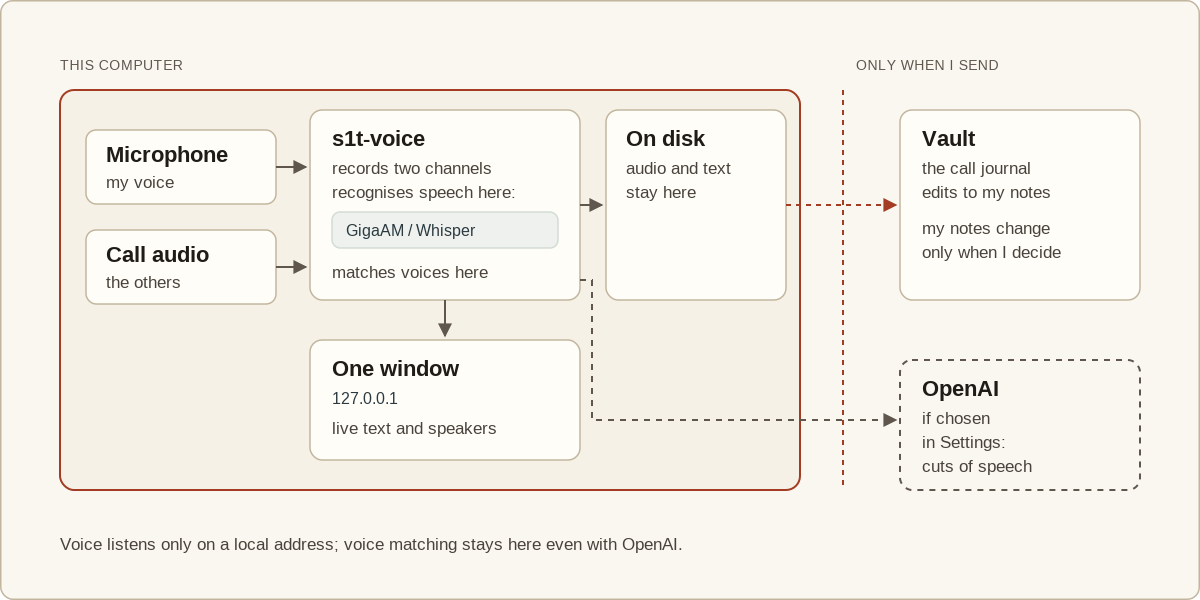
One window, one process. On my desktop, starting Voice a second time brings its window forward. My library and saved voices stay on this computer.
Whose voice does yours sound like?
Not working yet. When I launch this experiment, you will be able to record your voice here, save the sample under your name and listen to the voices that sound most like yours.